Friday, November 7, 2008

Get your submissions in for EclipseCon 2009!

Hi all!

Yes, it's just the first week of November... But November 24 is creeping up on us all too quickly... 18 days and will come and go and you'll be wondering where all the time went!

So it's time to think about a presentation for EclipseCon!

Simply want to share some cool tips or news with the world? Do a short talk! You only have to fill 10 minutes and it goes by like lightning.

Do you have more to say? Do a long talk! 50 minutes goes by very quickly.

Do you have too much to say in an hour and want to help people learn some new Eclipse skills? By all means try for a tutorial slot! Two hours of your very own to teach a few old (or new) developers some new tricks!

But don't wait too long! We'd love to see some DTP-themed talks. What cool things are you doing with Data Tools? Use it in new and twisted ways and share it with the rest of us!

Only 18 more days to get your proposals in!

Good luck and hope to see some talks soon!

--Fitz

Monday, September 22, 2008

Perceived Benefits of "Free" Open Source Software

Hi all...

Perceived benefits of Open Source involvement. I'm betting that nearly everyone in the Open Source community has wrestled with it at some point, either with customers, management, or both. And I have to admit, it was a bit of a shock to the system (in a good way) when I was introduced to the Eclipse community a few years ago. I didn't really have a good understanding of Open Source back then. And I may still not have a good handle on open source, but I'd like to think I know a little more than when I started.
German Weißbier
Open Source means different things to different people. Some people just see the word "free" and get all giddy. Others see it as an opportunity to spread the wealth a bit and help out the community. Frameworks are popular in this respect - just look at Eclipse, Apache, and SourceForge. Each has its own piece to the puzzle and companies and developers can take those bits and assemble them in cool and unique ways if they meet their needs.

But ultimately the "free" of Open Source is that it's "free" to use, modify, and redistribute within the scope of the license agreement under which it's distributed. Note that I didn't say it's "free" in what it costs to create or maintain.

Often you'll hear the phrase "free as in beer" not "free as in speech". Or gratis vs. libre. It takes time, money, and all the various ingredients for whatever it is you're putting together - whether that be virtual, like software, or physical, like beer.

Let me expand on that a bit. I like beer, so it's an easy analogy to expand on. :)

When the "beer" flows freely, it acts as more than just a social lubricant (those EclipseCon evening social events we do so enjoy). I think it actually greases the wheels of progress so individuals can get beyond the gears and widgets they may be stuck on and move on to higher levels of complexity. (For example, focusing on the design of the "car" and not the "nuts and bolts" required to put it all together.)

But in order for the "beer" to flow, somebody has to make it. Somebody must grow the hops and barley, secure water rights, acquire a facility to ferment and bottle the results, and so on. It takes effort to combine these ingredients, as well as time and money, into a nectar that can be shared to do all these wonderful things in an open community of ideas.

Each Eclipse project has its own brand of beer. And not everyone will be able to use every kind of beer that's available. Think of it as a brewery introducing a new wheat beer. I'm not a big wheat beer fan, but I can appreciate the care that goes into making it, and many of the processes involved are the same used for other beers, so there's a shared or at least similar set of ingredients that we can help with or at least support in this community of peers.

To continue the "beer" analogy, the Eclipse Foundation is as much a bottling facility and brew pub as it is an actual brewery. Its role is to help distribute the beer around the world, but also to gather communities and raise awareness so the beer doesn't stop flowing due to a lack of participation from those communities. Free beer does nothing for anyone if nobody knows about it and nobody drinks it.

So I see my role as the titular head of DTP (if only because we need a head to chop off should things get out of hand) to do three things at a high level...

  1. Represent Sybase's interests at Eclipse so we can continue making and drinking beer, whether it's a Sybase brand of beer or someone else's.
  2. Invite others to drink our beer so we start seeing more people drinking their way to newer and more exciting things that would then allow us to do bigger and better things as well.
  3. And make sure the beer continues to flow. Ingredients must keep coming to the brewery. New types of beer improve the richness of the overall production of the brewery, and sometimes we need to coordinate to help market and sell the beer to other distributors and markets to make sure the free exchange continues to perpetuate itself.
The grand goal is to continue to make the beer that we need to survive, but also allow open source, DTP, and Eclipse to expand and grow in surprising ways.

I'm constantly amazed at the breadth of products and projects that are beginning to adopt and use DTP for their own purposes. Every year, we add more great people and companies to the mix. So we need to continue to nurture and grow DTP to continue building awareness and adoption of our beer so that the immediate community as well as our customers are aware of our efforts.

So drink up... I'd like to see us making and drinking DTP beer for a long time to come. :)

--Fitz

Reblog this post [with Zemanta]

Thursday, August 28, 2008

Creating the SQLite Connection Profile UI bits

Hi there!

So now we're almost to our first functional version of a SQLite connection profile in DTP. We have a driver-wrapper plug-in, a driver definition, an overridden catalog loader, and a connection profile with its associated connection and connection factory classes. What's next? Why, adding the UI so you can create the profile, of course!

With versions of DTP prior to Ganymede, this was a more difficult, but not horrible task. In Ganymede, we've reduced the amount of work to adding three extension points and writing four key classes in a org.eclipse.datatools.enablement.sqlite.ui plug-in (basically just extending these classes a tad, so little real work involved):
  • A connection profile wizard extension that uses the org.eclipse.datatools.connectivity.connectionProfile extension and uses the newWizard node so we can define our wizard
  • A property page extension (org.eclipse.ui.propertyPages) to define a property page so we can edit our SQLite conneciton profile instances
  • A driver UI contributor extension (org.eclipse.datatools.connectivity.ui.driverUIContributor) to create a reusable UI component that gathers the information we need for our SQLite connections
  • A connection profile wizard class that extends the org.eclipse.datatools.connectivity.ui.wizards.ExtensibleNewConnectionProfileWizard class
  • A connection profile wizard page that extends org.eclipse.datatools.connectivity.ui.wizards.ExtensibleProfileDetailsWizardPage
  • A connection profile property page that extends org.eclipse.datatools.connectivity.ui.wizards.ExtensibleProfileDetailsPropertyPage
  • And a driver UI component that is used on the wizard and property pages that implements org.eclipse.datatools.connectivity.ui.wizards.IDriverUIContributor
It may look daunting, but really it boils down to a few extension points, a few extended classes, and an instance of poor man's inheritance (copying a class from another project).

So let's get started!

DTP's Been Babel-ized!

Rendering in Klingon gliphs of the word Qapla'...Image via Wikipedia Hi all!

Just thought I'd share some cool news from DTP land. I received word from Denis (via Bugzilla) that the initial translations for DTP's 1.6 (Ganymede) release have been added to Babel! Yay!

I would like to thank the folks who helped get us going with translations in Babel:
  • Antoine Toulmé
  • Yasuo Doshiro
  • Denis Roy
  • and Kit Lo
So thanks to everybody who helped get us started. Pretty soon we'll be able to have DTP in Klingon (probably not, but it's an interesting concept at any rate!)!

--Fitz
Reblog this post [with Zemanta]

Wednesday, August 20, 2008

Creating an Actual SQLite Connection Profile (minus the UI)

Hi there!

So now we have the majority of our work done. We have a driver-wrapper plug-in, a driver definition, and an overridden catalog loader. What's next? Wrapping the functionality in a nice, easy to use connection profile!

Note: Previous articles in this series cover the following topics: Catalog Loaders, Driver Templates, and the Driver Framework.

Many moons ago, we talked at a high level about the driver template & driver definition frameworks. It's now time to talk briefly about the connection profile framework.

It all boils down to this... A connection profile manages a connection to something. Right now in DTP we connect to JDBC databases and file systems for the most part. But the Sybase WorkSpace product also uses DTP to connect to application servers, LDAP, UDDI repositories, and much more. So it's not limited in any way.

With that in mind, a JDBC database connection profile, such as the one we want to create for SQLite, just needs to manage a JDBC connection under the covers. We'll add a layer on top of that to attach the SQL Model to the connection so we can display the database specifics in the Data Source Explorer tree.

In the DTP Ganymede (1.6) release, we've really simplified creating a new connection profile if it's associated with a db definition vendor/version and a driver template. So we'll take advantage of that for SQLite.

To create a connection profile, we will go to the org.eclipse.datatools.enablement.sqlite plug-in project and create a couple of classes and two extension points. These steps are kind of chicken & egg - the order isn't really important so long as you get them all done.

Step 1: Create a new connection factory and connection class for SQLite. These are the actual raw connections that our SQLite connection profile will manage for us.

The connection class is pretty easy. We're just going to extend the Generic JDBC JDBCConnection class for SQLite so we have our own specialized version of it.

That code looks like this:
package org.eclipse.datatools.enablement.sqlite.connection;

import org.eclipse.datatools.connectivity.IConnectionProfile;
import org.eclipse.datatools.connectivity.db.generic.JDBCConnection;

public class SQLITEJDBCConnection extends JDBCConnection {

/**
* @param profile
* @param factoryClass
*/
public SQLITEJDBCConnection(IConnectionProfile profile,
Class factoryClass) {
super(profile, factoryClass);
}
}

The connection factory requires a little more work, but not much more:
package org.eclipse.datatools.enablement.sqlite.connection;

import org.eclipse.datatools.connectivity.IConnection;
import org.eclipse.datatools.connectivity.IConnectionProfile;
import org.eclipse.datatools.connectivity.db.generic.JDBCConnectionFactory;

public class SQLITEJDBCConnectionFactory extends JDBCConnectionFactory {

public SQLITEJDBCConnectionFactory() {
super();
}

public IConnection createConnection(IConnectionProfile profile) {
SQLITEJDBCConnection connection = new SQLITEJDBCConnection(profile, getClass());
connection.open();
return connection;
}
}

Basically in the connection factory, we're just creating one of our new SQLiteJDBCConnection class instances for the profile that's passed in.

Step 2: We want to add a new extension point to the plugin.xml in the org.eclipse.datatools.enablement.sqlite plug-in project: org.eclipse.datatools.connectivity.connectionProfile.
This extension point has a couple of nodes we're going to create beneath it: connectionFactory and connectionProfile.

Let's define our connectionProfile first, so we have the connection profile ID to use for the connectionFactory.


You can see from the screen that we're giving our connection profile the following properties:
  • id = org.eclipse.datatools.enablement.sqlite.connectionProfile
  • category = org.eclipse.datatools.connectivity.db.category (this ensures that our connection profile shows up under the "Databases" category in the DSE)
  • name = SQLite Connection Profile
  • icon = icons/jdbc_16.gif (you can copy this from the Generic JDBC connection profile plug-in)
  • pingFactory = org.eclipse.datatools.enablement.sqlite.connection.SQLITEJDBCConnectionFactory (our new connection factory class we created in step 1)
Then we define our connectionFactory:


Our connectionFactory extension has the following properties:
  • id = java.sql.Connection (this maps to the type of connection this connection factory/connection class maps back to -- in this case, a JDBC connection)
  • class = org.eclipse.datatools.enablement.sqlite.connection.SQLITEJDBCConnectionFactory (our connection factory class)
  • profile = org.eclipse.datatools.enablement.sqlite.connectionProfile (our SQLite connection profile ID from the connectionProfile extension)
  • name = SQLite Connection Factory
So now we have a connection profile for SQLite in DTP. Now all we need is a user interface (wizard, wizard page, property page, and driver UI) and we'll be golden!

That's what we'll cover next time.
--Fitz

Reblog this post [with Zemanta]

Tuesday, August 19, 2008

Eclipse's e4 vs. Microsoft's e7

Hey all...

This is slightly off topic... But I just saw an interesting post over at PC Magazine's site... Evidently the Microsoft Windows 7 team has created a new blog (you can see it here) and the shorthand term for Windows 7 is e7.

Isn't it kind of odd in the year when e4 is getting ramped up for Eclipse that Microsoft would also have their own "e" term for a release? I guess there *are* only 26 letters in the alphabet... So there's a *chance* (small, but there) it was random...

Anybody else have any thoughts?
--Fitz
Reblog this post [with Zemanta]

Thursday, August 7, 2008

DTP SQLite support continued... on to Catalog Loaders...

Hi all...

Yes, it's been a while since I wrote the last article in this series. I apologize for that. This summer has been busy both at work and home (not like I got to go on a cruise like Ed Merks or anything, but we've been bouncing around!). So the series of articles fell by the wayside a bit.

That said... Let's get back to it. When we last left our intrepid coders, we were working through the steps of trying to get SQLite to connect and show its underlying model (schemas/tables/procedures, etc.) in the Data Source Explorer. We had just finished creating some driver templates (see that article here) and that didn't really buy us all that much.

The next step is to then create a custom catalog loader to take care of any shortcomings of the SQLite driver. We have a db definition (vendor/version) to hang the catalog loader from, which means we just have to choose which level to focus on first.

In this case, since we're interested in schemas as the highest level of the model for SQLite, we'll override the schema catalog loader.

To do this, we need to do a things.

1) In the plug-in manifest editor (opened either from MANIFEST.MF or plugin.xml) for the org.eclipse.datatools.enablement.sqlite plug-in project, we need to add a new dependency. Select the Dependencies tab in the manifest editor and add org.eclipse.connectivity.sqm.core. This will provide one of the extension points that we need to extend to override the catalog loader.

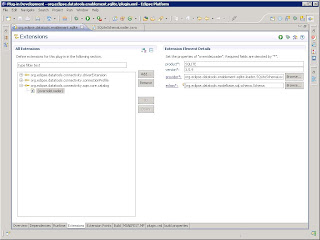
2) On the Extensions tab, add a new extension and select org.eclipse.datatools.connectivity.sqm.core.catalog. Right-click on the extension and select "overrideLoader". Then select the "overrideLoader" node in the extension tree. You should see something like the following:
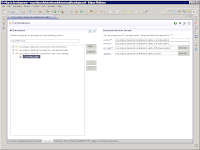

Product and version equate directly to the db definition that we've already created. Provider is the actual loader class we'll override the default with. And eclass is the SQL model class that we want to override the loader for our SQLite databases.

In this case:

* product = SQLITE
* version = 3.5.9
* eclass = org.eclipse.datatools.modelbase.sql.schema.Schema
* provider = a new class we'll create called SQLiteSchemaLoader

The SQLiteSchemaLoader looks something like this:

package org.eclipse.datatools.enablement.sqlite.loader;

import org.eclipse.datatools.connectivity.sqm.core.rte.ICatalogObject;
import org.eclipse.datatools.connectivity.sqm.loader.IConnectionFilterProvider;
import org.eclipse.datatools.connectivity.sqm.loader.JDBCSchemaLoader;

public class SQLiteSchemaLoader extends JDBCSchemaLoader {

public SQLiteSchemaLoader(ICatalogObject catalogObject,
IConnectionFilterProvider connectionFilterProvider) {

super(catalogObject, connectionFilterProvider);

}
}


Since SQLite has no concept of a "schema", we need to dummy one up so that the model is satisfied. (Yes, this is one more case where the loose JDBC "standard" bites us in the rear when we try to adhere to it.) To do that, we really only need to focus on overriding a couple of key methods:

* protected void initialize(Schema schema, ResultSet rs) throws SQLException
* public void loadSchemas(List containmentList, Collection existingSchemas) throws SQLException

In the default JDBCSchemaLoader, it relies on the driver to provide a result set of schemas. In the SQLite case, since there are none, we need to change the behavior to just dummy up a schema object and pass it along.

So loadSchemas becomes:
public void loadSchemas(List containmentList, Collection existingSchemas)
throws SQLException {
Schema schema = (Schema) getAndRemoveSQLObject(existingSchemas,
"DEFAULT");
if (schema == null) {
schema = processRow(null);
if (schema != null) {
containmentList.add(schema);
}
}
else {
containmentList.add(schema);
if (schema instanceof ICatalogObject) {
((ICatalogObject) schema).refresh();
}
}
}


And initialize is changed to ignore the result set and just name the schema "DEFAULT":
protected void initialize(Schema schema, ResultSet rs) throws SQLException {
schema.setName("DEFAULT");
}


The last thing we have to do is make our catalog loader class actually run as an executable extension. If we don't add the following constructor, you get an InstantiationException, which is always a pain to track down:
public SQLiteSchemaLoader() {
super(null);
}


Once the dummy schema is in place, the driver actually does return the tables list correctly, as seen in the following screen shot.
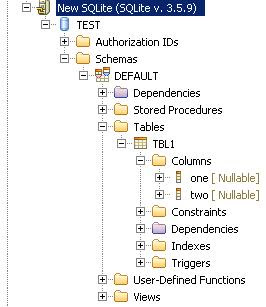


However... It appears that the SQLite driver does not return getImportedKeys() directly (it throws a "not yet implemented" SQLException for me), so we will need to clean up the JDBCTableConstraintLoader before we're done, but we can do that during code cleanup. (We'll also have to remove some of the nodes that don't make sense for a SQLite database, such as Authorization IDs, Stored Procedures and User-defined Functions.)

So now we have a (mostly) working catalog loader that will connect to a SQLite database and allow us to drill in and see tables and columns.

In the next article we'll walk through the simplified process for creating a brand new connection profile (wizard, wizard page, property page, connection factory, and connection classes). And then we can talk about the clean up phases and some of the nice things we can do to help out our users and developers.

Hope that helps!

--Fitz
Zemanta Pixie