Showing posts with label SQL. Show all posts

Thursday, March 19, 2009

DTP at EclipseCon 2009

Hey there!

Yes, it's almost that time again... EclipseCon 2009 starts with a bang on Monday. Can you believe it? It's already here!!

I head out to the (hopefully sunny) state of California on Sunday morning early for a boatload of meetings that afternoon and then DTP has a tutorial bright and early Monday morning at 8am.

But I thought I'd fill everyone in on what's cool in the world of DTP at EclipseCon this year...

We have our tutorial obviously -- "Using and Extending Eclipse Data Tools (DTP)" on Monday morning at 8am. If you're planning on attending, please check out the list of pre-requisites. We'll start with the DTP tooling, talk about DTP APIs, and then go a bit into how to extend the ODA and SQL editor for your own particular uses. Linda Chan (Actuate), Brian Payton (IBM), and myself will be presenting.

We also have a couple of long talks...
And a number of short talks that will be collected into one curated session hosted by yours truly...
So it's not forgotten, we also have a Birds of a Feather session on Monday night. If you want to come and chat, ask questions, and see what's going on in the world of DTP please drop by!
And if you're going to attend the Eclipse Community Spotlight panel at the end of the conference, you'll get to see a bunch of us talking about what's going on in the world of Eclipse.

So be sure to check us out while you're at EclipseCon! I hope to see you there!

--Fitz
Reblog this post [with Zemanta]

Monday, January 19, 2009

Cool DTP Talks at EclipseCon 2009

Hey all!

I'm always amazed by the depth and breadth of talks at EclipseCon and this year is no different. In the Data Tooling category, we have a diverse set of talks (you can see the list here) on everything from some new tooling we've been working on, updates to the Graphical SQL Query Builder, how Ingres is rolling DTP components in new and unique ways, to using YouTube in DTP and how a commercial vendor (IBM) is using and extending DTP APIs for their PureQuery product.

I have to admit I'm sort of partial to the YouTube presentation I'm doing :), but I'm very curious to hear Ingres and IBM talk about their tooling and products and how DTP is playing a role in those.

For those of you just getting started with DTP, we have a tutorial scheduled for the Monday of the conference that's going to walk through a ton of topics from adding a new JDBC driver to the mix, to supporting a new database, and customizing SQL syntax and so on...

DTP is much more than just a great set of tools for data access... It's a great community. And EclipseCon is when that community comes together.

Come join our community!

--Fitz
Reblog this post [with Zemanta]

Friday, December 19, 2008

Data Tools at EclipseCon 2009

Hey all!

Yes, the holidays are almost upon us... But even better than that, EclipseCon 2009 is just around the corner! (Ok, maybe not RIGHT around the corner, but three months will zip by in no time.)

This year in the Data Tools track we have a tutorial coming up and bunch of cool talks from a number of different directions.

Though I'm helping with the tutorial this year and moderating a block of short talks, I also am talking about how to use DTP to connect to something other than a database. After all, not all data is in databases!

My long talk this year will show how DTP and the Data Source Explorer can be used for searching and viewing YouTube videos in Eclipse. How do these two worlds meet? Come to my talk and find out!

Besides that, I get to moderate a set of three cool short talks. These bright folks will talk about how DTP is being used in RCP as a database developer's type of tool, what's going on with the SQL Query Builder in Galileo, and how DTP is being used in cool ways by a commercial application.

So be sure to check out some of our talks this year! In another post, I'll talk some about what to expect from our tutorial and some of the other cool talks going on at EC2009 that I'm excited about!

Register today and don't forget to reserve a room at the hotel (it fills up fast!)!

Happy Holidays to all!
--Fitz

Reblog this post [with Zemanta]

Wednesday, August 20, 2008

Creating an Actual SQLite Connection Profile (minus the UI)

Hi there!

So now we have the majority of our work done. We have a driver-wrapper plug-in, a driver definition, and an overridden catalog loader. What's next? Wrapping the functionality in a nice, easy to use connection profile!

Note: Previous articles in this series cover the following topics: Catalog Loaders, Driver Templates, and the Driver Framework.

Many moons ago, we talked at a high level about the driver template & driver definition frameworks. It's now time to talk briefly about the connection profile framework.

It all boils down to this... A connection profile manages a connection to something. Right now in DTP we connect to JDBC databases and file systems for the most part. But the Sybase WorkSpace product also uses DTP to connect to application servers, LDAP, UDDI repositories, and much more. So it's not limited in any way.

With that in mind, a JDBC database connection profile, such as the one we want to create for SQLite, just needs to manage a JDBC connection under the covers. We'll add a layer on top of that to attach the SQL Model to the connection so we can display the database specifics in the Data Source Explorer tree.

In the DTP Ganymede (1.6) release, we've really simplified creating a new connection profile if it's associated with a db definition vendor/version and a driver template. So we'll take advantage of that for SQLite.

To create a connection profile, we will go to the org.eclipse.datatools.enablement.sqlite plug-in project and create a couple of classes and two extension points. These steps are kind of chicken & egg - the order isn't really important so long as you get them all done.

Step 1: Create a new connection factory and connection class for SQLite. These are the actual raw connections that our SQLite connection profile will manage for us.

The connection class is pretty easy. We're just going to extend the Generic JDBC JDBCConnection class for SQLite so we have our own specialized version of it.

That code looks like this:
package org.eclipse.datatools.enablement.sqlite.connection;

import org.eclipse.datatools.connectivity.IConnectionProfile;
import org.eclipse.datatools.connectivity.db.generic.JDBCConnection;

public class SQLITEJDBCConnection extends JDBCConnection {

/**
* @param profile
* @param factoryClass
*/
public SQLITEJDBCConnection(IConnectionProfile profile,
Class factoryClass) {
super(profile, factoryClass);
}
}

The connection factory requires a little more work, but not much more:
package org.eclipse.datatools.enablement.sqlite.connection;

import org.eclipse.datatools.connectivity.IConnection;
import org.eclipse.datatools.connectivity.IConnectionProfile;
import org.eclipse.datatools.connectivity.db.generic.JDBCConnectionFactory;

public class SQLITEJDBCConnectionFactory extends JDBCConnectionFactory {

public SQLITEJDBCConnectionFactory() {
super();
}

public IConnection createConnection(IConnectionProfile profile) {
SQLITEJDBCConnection connection = new SQLITEJDBCConnection(profile, getClass());
connection.open();
return connection;
}
}

Basically in the connection factory, we're just creating one of our new SQLiteJDBCConnection class instances for the profile that's passed in.

Step 2: We want to add a new extension point to the plugin.xml in the org.eclipse.datatools.enablement.sqlite plug-in project: org.eclipse.datatools.connectivity.connectionProfile.
This extension point has a couple of nodes we're going to create beneath it: connectionFactory and connectionProfile.

Let's define our connectionProfile first, so we have the connection profile ID to use for the connectionFactory.


You can see from the screen that we're giving our connection profile the following properties:
  • id = org.eclipse.datatools.enablement.sqlite.connectionProfile
  • category = org.eclipse.datatools.connectivity.db.category (this ensures that our connection profile shows up under the "Databases" category in the DSE)
  • name = SQLite Connection Profile
  • icon = icons/jdbc_16.gif (you can copy this from the Generic JDBC connection profile plug-in)
  • pingFactory = org.eclipse.datatools.enablement.sqlite.connection.SQLITEJDBCConnectionFactory (our new connection factory class we created in step 1)
Then we define our connectionFactory:


Our connectionFactory extension has the following properties:
  • id = java.sql.Connection (this maps to the type of connection this connection factory/connection class maps back to -- in this case, a JDBC connection)
  • class = org.eclipse.datatools.enablement.sqlite.connection.SQLITEJDBCConnectionFactory (our connection factory class)
  • profile = org.eclipse.datatools.enablement.sqlite.connectionProfile (our SQLite connection profile ID from the connectionProfile extension)
  • name = SQLite Connection Factory
So now we have a connection profile for SQLite in DTP. Now all we need is a user interface (wizard, wizard page, property page, and driver UI) and we'll be golden!

That's what we'll cover next time.
--Fitz

Reblog this post [with Zemanta]

Thursday, August 7, 2008

DTP SQLite support continued... on to Catalog Loaders...

Hi all...

Yes, it's been a while since I wrote the last article in this series. I apologize for that. This summer has been busy both at work and home (not like I got to go on a cruise like Ed Merks or anything, but we've been bouncing around!). So the series of articles fell by the wayside a bit.

That said... Let's get back to it. When we last left our intrepid coders, we were working through the steps of trying to get SQLite to connect and show its underlying model (schemas/tables/procedures, etc.) in the Data Source Explorer. We had just finished creating some driver templates (see that article here) and that didn't really buy us all that much.

The next step is to then create a custom catalog loader to take care of any shortcomings of the SQLite driver. We have a db definition (vendor/version) to hang the catalog loader from, which means we just have to choose which level to focus on first.

In this case, since we're interested in schemas as the highest level of the model for SQLite, we'll override the schema catalog loader.

To do this, we need to do a things.

1) In the plug-in manifest editor (opened either from MANIFEST.MF or plugin.xml) for the org.eclipse.datatools.enablement.sqlite plug-in project, we need to add a new dependency. Select the Dependencies tab in the manifest editor and add org.eclipse.connectivity.sqm.core. This will provide one of the extension points that we need to extend to override the catalog loader.

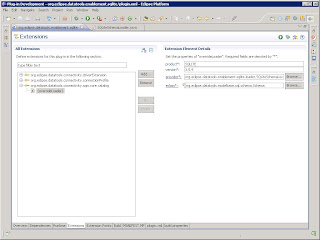
2) On the Extensions tab, add a new extension and select org.eclipse.datatools.connectivity.sqm.core.catalog. Right-click on the extension and select "overrideLoader". Then select the "overrideLoader" node in the extension tree. You should see something like the following:
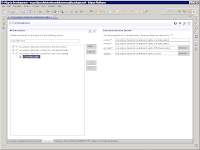

Product and version equate directly to the db definition that we've already created. Provider is the actual loader class we'll override the default with. And eclass is the SQL model class that we want to override the loader for our SQLite databases.

In this case:

* product = SQLITE
* version = 3.5.9
* eclass = org.eclipse.datatools.modelbase.sql.schema.Schema
* provider = a new class we'll create called SQLiteSchemaLoader

The SQLiteSchemaLoader looks something like this:

package org.eclipse.datatools.enablement.sqlite.loader;

import org.eclipse.datatools.connectivity.sqm.core.rte.ICatalogObject;
import org.eclipse.datatools.connectivity.sqm.loader.IConnectionFilterProvider;
import org.eclipse.datatools.connectivity.sqm.loader.JDBCSchemaLoader;

public class SQLiteSchemaLoader extends JDBCSchemaLoader {

public SQLiteSchemaLoader(ICatalogObject catalogObject,
IConnectionFilterProvider connectionFilterProvider) {

super(catalogObject, connectionFilterProvider);

}
}


Since SQLite has no concept of a "schema", we need to dummy one up so that the model is satisfied. (Yes, this is one more case where the loose JDBC "standard" bites us in the rear when we try to adhere to it.) To do that, we really only need to focus on overriding a couple of key methods:

* protected void initialize(Schema schema, ResultSet rs) throws SQLException
* public void loadSchemas(List containmentList, Collection existingSchemas) throws SQLException

In the default JDBCSchemaLoader, it relies on the driver to provide a result set of schemas. In the SQLite case, since there are none, we need to change the behavior to just dummy up a schema object and pass it along.

So loadSchemas becomes:
public void loadSchemas(List containmentList, Collection existingSchemas)
throws SQLException {
Schema schema = (Schema) getAndRemoveSQLObject(existingSchemas,
"DEFAULT");
if (schema == null) {
schema = processRow(null);
if (schema != null) {
containmentList.add(schema);
}
}
else {
containmentList.add(schema);
if (schema instanceof ICatalogObject) {
((ICatalogObject) schema).refresh();
}
}
}


And initialize is changed to ignore the result set and just name the schema "DEFAULT":
protected void initialize(Schema schema, ResultSet rs) throws SQLException {
schema.setName("DEFAULT");
}


The last thing we have to do is make our catalog loader class actually run as an executable extension. If we don't add the following constructor, you get an InstantiationException, which is always a pain to track down:
public SQLiteSchemaLoader() {
super(null);
}


Once the dummy schema is in place, the driver actually does return the tables list correctly, as seen in the following screen shot.
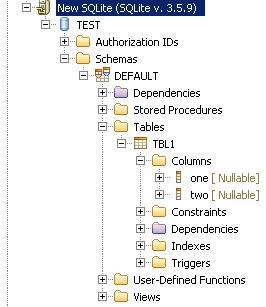


However... It appears that the SQLite driver does not return getImportedKeys() directly (it throws a "not yet implemented" SQLException for me), so we will need to clean up the JDBCTableConstraintLoader before we're done, but we can do that during code cleanup. (We'll also have to remove some of the nodes that don't make sense for a SQLite database, such as Authorization IDs, Stored Procedures and User-defined Functions.)

So now we have a (mostly) working catalog loader that will connect to a SQLite database and allow us to drill in and see tables and columns.

In the next article we'll walk through the simplified process for creating a brand new connection profile (wizard, wizard page, property page, connection factory, and connection classes). And then we can talk about the clean up phases and some of the nice things we can do to help out our users and developers.

Hope that helps!

--Fitz
Zemanta Pixie